<?xml version="1.0" encoding="UTF-8"?>
<!--Generated by Squarespace Site Server v5.11.81 (http://www.squarespace.com/) on Thu, 31 May 2012 01:26:55 GMT--><feed xmlns="http://www.w3.org/2005/Atom" xmlns:dc="http://purl.org/dc/elements/1.1/"><title>Blog</title><subtitle>Blog</subtitle><id>http://www.jordanmontreuil.com/blog/</id><link rel="alternate" type="application/xhtml+xml" href="http://www.jordanmontreuil.com/blog/"/><link rel="self" type="application/atom+xml" href="http://www.jordanmontreuil.com/blog/atom.xml"/><updated>2012-05-07T15:37:32Z</updated><generator uri="http://www.squarespace.com/" version="Squarespace Site Server v5.11.81 (http://www.squarespace.com/)">Squarespace</generator><entry><title>Crumpling Metal With Cinema 4D's Cloth System</title><id>http://www.jordanmontreuil.com/blog/2012/5/7/crumpling-metal-with-cinema-4ds-cloth-system.html</id><link rel="alternate" type="text/html" href="http://www.jordanmontreuil.com/blog/2012/5/7/crumpling-metal-with-cinema-4ds-cloth-system.html"/><author><name>Jordan Montreuil</name></author><published>2012-05-07T15:12:09Z</published><updated>2012-05-07T15:12:09Z</updated><content type="html" xml:lang="en-US"><![CDATA[<p>You know you can use Cinema 4D's cloth to make cloth (of course) but did you know that with experimentation you can simulate metal crumpling and deforming on impact? Check it out!</p>
<p>&nbsp;<span class="full-image-block ssNonEditable"><span><img src="http://www.jordanmontreuil.com/storage/post-images/metalBox.png?__SQUARESPACE_CACHEVERSION=1336405026571" alt="" /></span></span></p>
<p>&nbsp;</p>
<p>This project file shows off some of my experimentation, you can download it below.</p>
<p><a title="Download Project File" href="http://bit.ly/metalCrumple">http://bit.ly/metalCrumple </a></p>
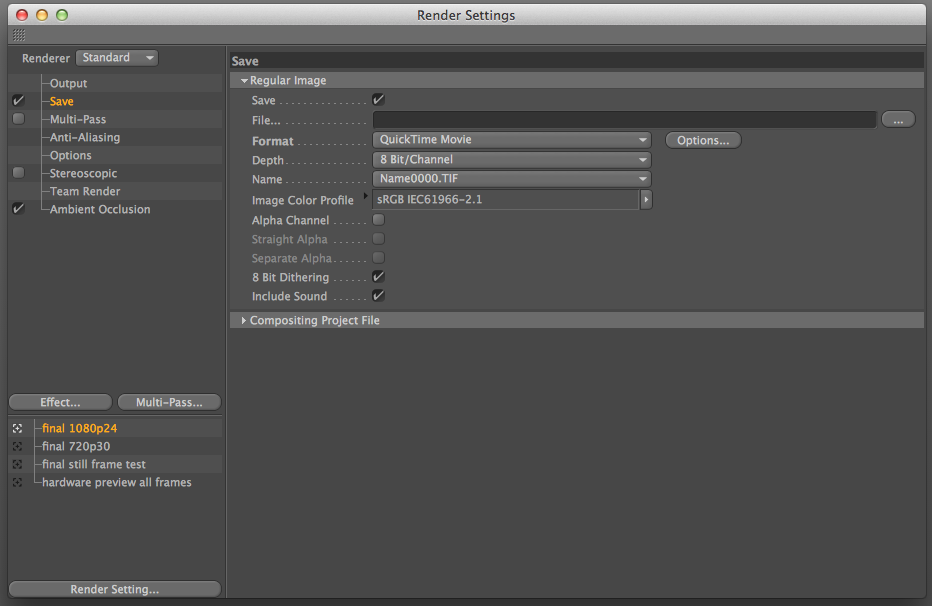
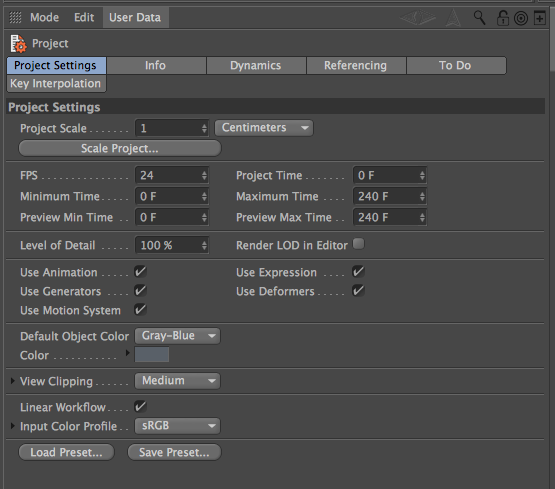
<p>It was made with R13 but the techniques done can be replicated in older versions of C4D as well. All you need to do is copy the settings below. And of course: experiment, experiment, experiment!</p>
<p>&nbsp;</p>
<p>For the metal box:</p>
<p><span class="full-image-block ssNonEditable"><span><img src="http://www.jordanmontreuil.com/storage/post-images/metalBoxsettings.png?__SQUARESPACE_CACHEVERSION=1336403801646" alt="" /></span></span></p>
<p>&nbsp;</p>
<p>For the Metal Sphere:</p>
<p><span class="full-image-block ssNonEditable"><span><img src="http://www.jordanmontreuil.com/storage/post-images/metalSpheresettings.png?__SQUARESPACE_CACHEVERSION=1336403845168" alt="" /></span></span></p>]]></content></entry><entry><title>Announcing the Handmade Art Shader Collection for Cinema 4D</title><category term="cinema 4d"/><category term="materials"/><category term="shaders"/><category term="textures"/><id>http://www.jordanmontreuil.com/blog/2011/9/16/announcing-the-handmade-art-shader-collection-for-cinema-4d.html</id><link rel="alternate" type="text/html" href="http://www.jordanmontreuil.com/blog/2011/9/16/announcing-the-handmade-art-shader-collection-for-cinema-4d.html"/><author><name>Jordan Montreuil</name></author><published>2011-09-16T15:08:54Z</published><updated>2011-09-16T15:08:54Z</updated><content type="html" xml:lang="en-US"><![CDATA[<p>I am pleased to announce my first product for Cinema 4D: <a href="http://www.jordanmontreuil.com/art-shaders/">Handmade Art Shaders</a>!</p>
<p><span class="full-image-block ssNonEditable"><span><img src="http://www.jordanmontreuil.com/storage/site-images/sampler_preview_notitle.jpg?__SQUARESPACE_CACHEVERSION=1316185831806" alt="" /></span></span></p>
<p><span id="internal-source-marker_0.6758015691931202" style="font-size: 11pt; font-family: Arial; color: #000000; background-color: transparent; font-weight: normal; font-style: normal; font-variant: normal; text-decoration: none; vertical-align: baseline;">This  is a collection of &ldquo;handmade&rdquo; Cinema 4D shaders were created by myself  and another artist. We used various art mediums (charcoal, pencil, dry  pastel, etc.) on art supply paper, then brought each handmade shader  into Cinema 4D. &nbsp;You can use Cinema 4D&rsquo;s Sketch and Toon Art Shader  feature to take our shaders and stylize your objects however you want.  &nbsp;Cinema 4D uses our handmade shaders to apply tones to your objects to  mimic three dimensional shading.</span><br /><br /><span style="font-size: 11pt; font-family: Arial; color: #000000; background-color: transparent; font-weight: normal; font-style: normal; font-variant: normal; text-decoration: none; vertical-align: baseline;">Our  <a href="http://www.jordanmontreuil.com/art-shaders/">Handmade Art Shader Master Collection</a> includes the following materials:  charcoal, pencil, marker, dry pastel, acrylic paint and oil paint. You  can purchase the Master Collection that includes 68 unique shaders with  18 different variations of color for a total of more than 1200 shaders. </span><br /><br /><span style="font-size: 11pt; font-family: Arial; color: #000000; background-color: transparent; font-weight: normal; font-style: normal; font-variant: normal; text-decoration: none; vertical-align: baseline;">We  also offer the each shader for sale separately, if you&rsquo;d prefer to work  with a single medium (charcoal, pencil, marker, etc.).</span><br /><br /><span style="font-size: 11pt; font-family: Arial; color: #000000; background-color: transparent; font-weight: normal; font-style: normal; font-variant: normal; text-decoration: none; vertical-align: baseline;">Check  out our FREE &ldquo;Art Shader Preview Pack&rdquo;! &nbsp;We&rsquo;ve bundled one of each  shader so you can demo our shaders before buying them. You can find the  Preview Pack at the bottom of the <a href="http://www.jordanmontreuil.com/art-shaders/">product page</a>.</span></p>
<p><span style="font-size: 11pt; font-family: Arial; color: #000000; background-color: transparent; font-weight: normal; font-style: normal; font-variant: normal; text-decoration: none; vertical-align: baseline;">What are you waiting for? <a href="http://www.jordanmontreuil.com/art-shaders/">Check them out!</a></span></p>
<p><span style="font-size: 11pt; font-family: Arial; color: #000000; background-color: transparent; font-weight: normal; font-style: normal; font-variant: normal; text-decoration: none; vertical-align: baseline;">Note:  These shaders require the Sketch and Toon module. If you are unsure if  you have Sketch and Toon, you can try out the Preview Pack and see if  they work.</span></p>]]></content></entry><entry><title>New Project - Rock and Roll Hearts Logo Build</title><category term="mograph"/><id>http://www.jordanmontreuil.com/blog/2011/6/20/new-project-rock-and-roll-hearts-logo-build.html</id><link rel="alternate" type="text/html" href="http://www.jordanmontreuil.com/blog/2011/6/20/new-project-rock-and-roll-hearts-logo-build.html"/><author><name>Jordan Montreuil</name></author><published>2011-06-20T12:11:42Z</published><updated>2011-06-20T12:11:42Z</updated><summary type="html" xml:lang="en-US"><![CDATA[<p></p>]]></summary></entry><entry><title>Extend Animation Tracks in Cinema 4D</title><category term="tutorials"/><id>http://www.jordanmontreuil.com/blog/2011/5/10/extend-animation-tracks-in-cinema-4d.html</id><link rel="alternate" type="text/html" href="http://www.jordanmontreuil.com/blog/2011/5/10/extend-animation-tracks-in-cinema-4d.html"/><author><name>Jordan Montreuil</name></author><published>2011-05-10T20:38:21Z</published><updated>2011-05-10T20:38:21Z</updated><summary type="html" xml:lang="en-US"><![CDATA[<p></p>]]></summary></entry><entry><title>In Defense of Co-op in Elder Scrolls: Skyrim</title><category term="Musings"/><id>http://www.jordanmontreuil.com/blog/2011/3/1/in-defense-of-co-op-in-elder-scrolls-skyrim.html</id><link rel="alternate" type="text/html" href="http://www.jordanmontreuil.com/blog/2011/3/1/in-defense-of-co-op-in-elder-scrolls-skyrim.html"/><author><name>Jordan Montreuil</name></author><published>2011-03-01T12:05:46Z</published><updated>2011-03-01T12:05:46Z</updated><summary type="html" xml:lang="en-US"><![CDATA[<p></p>]]></summary></entry><entry><title>Using Weight Transform in Cinema 4D to Control Your Effectors</title><category term="tutorials"/><id>http://www.jordanmontreuil.com/blog/2010/11/6/using-weight-transform-in-cinema-4d-to-control-your-effector.html</id><link rel="alternate" type="text/html" href="http://www.jordanmontreuil.com/blog/2010/11/6/using-weight-transform-in-cinema-4d-to-control-your-effector.html"/><author><name>Jordan Montreuil</name></author><published>2010-11-06T22:16:09Z</published><updated>2010-11-06T22:16:09Z</updated><summary type="html" xml:lang="en-US"><![CDATA[<p></p>]]></summary></entry><entry><title>How to Use Cinema 4D's Animation Layers Feature in R11 and Above</title><category term="tutorials"/><id>http://www.jordanmontreuil.com/blog/2010/9/13/how-to-use-cinema-4ds-animation-layers-feature-in-r11-and-ab.html</id><link rel="alternate" type="text/html" href="http://www.jordanmontreuil.com/blog/2010/9/13/how-to-use-cinema-4ds-animation-layers-feature-in-r11-and-ab.html"/><author><name>Jordan Montreuil</name></author><published>2010-09-13T15:52:10Z</published><updated>2010-09-13T15:52:10Z</updated><summary type="html" xml:lang="en-US"><![CDATA[<p></p>]]></summary></entry><entry><title>Caged Insider: Introduction Video Proof of Concept and Breakdown</title><category term="tutorials"/><id>http://www.jordanmontreuil.com/blog/2010/8/24/caged-insider-introduction-video-proof-of-concept-and-breakd.html</id><link rel="alternate" type="text/html" href="http://www.jordanmontreuil.com/blog/2010/8/24/caged-insider-introduction-video-proof-of-concept-and-breakd.html"/><author><name>Jordan Montreuil</name></author><published>2010-08-24T19:36:02Z</published><updated>2010-08-24T19:36:02Z</updated><summary type="html" xml:lang="en-US"><![CDATA[<p></p>]]></summary></entry><entry><title>How to Color Correction Stop Motion Sequences in Final Cut Pro</title><category term="tutorials"/><id>http://www.jordanmontreuil.com/blog/2010/8/6/how-to-color-correction-stop-motion-sequences-in-final-cut-p.html</id><link rel="alternate" type="text/html" href="http://www.jordanmontreuil.com/blog/2010/8/6/how-to-color-correction-stop-motion-sequences-in-final-cut-p.html"/><author><name>Jordan Montreuil</name></author><published>2010-08-06T12:57:54Z</published><updated>2010-08-06T12:57:54Z</updated><summary type="html" xml:lang="en-US"><![CDATA[<p></p>]]></summary></entry><entry><title>Running With the Wolves</title><category term="film"/><id>http://www.jordanmontreuil.com/blog/2010/8/5/running-with-the-wolves.html</id><link rel="alternate" type="text/html" href="http://www.jordanmontreuil.com/blog/2010/8/5/running-with-the-wolves.html"/><author><name>Jordan Montreuil</name></author><published>2010-08-05T21:26:48Z</published><updated>2010-08-05T21:26:48Z</updated><summary type="html" xml:lang="en-US"><![CDATA[<p></p>]]></summary></entry></feed>